

Tap, snap, go – it's the easiest way to deposit your checks
Deposit checks anytime, anywhere by following this quick process through our mobile app:
1. Sign the back of the check and write
- For Mobile Deposit Only
- First Financial Credit Union
2. Open our mobile app and select 'Check Deposit'
3. Select the account to deposit and the amount
4. Select the camera feature in our Mobile App to take pictures of the check (front and back)
Please note: Retain your deposited check(s) for 30 days and then securely destroy.
IMPORTANT: Mobile check deposits that are not properly endorsed will be returned, and a $35 Return of Deposited Item fee may apply—please view our fee schedule for more details.
ATM & Branch Deposits
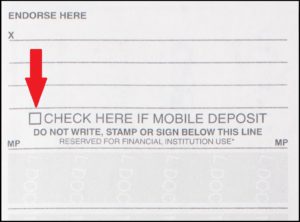
Important: When making a deposit at an ATM or branch, please do not check off mobile deposit on the back of the check or make any notation that it is a mobile deposit. Deposits incorrectly marked will be returned and a Return of Deposited fee may apply.
We're Here to Serve You!
Our various banking options are designed to help you reach your goals. We're here to help.